DC Power Supply Makes Electronics Testing Easier Than Ever

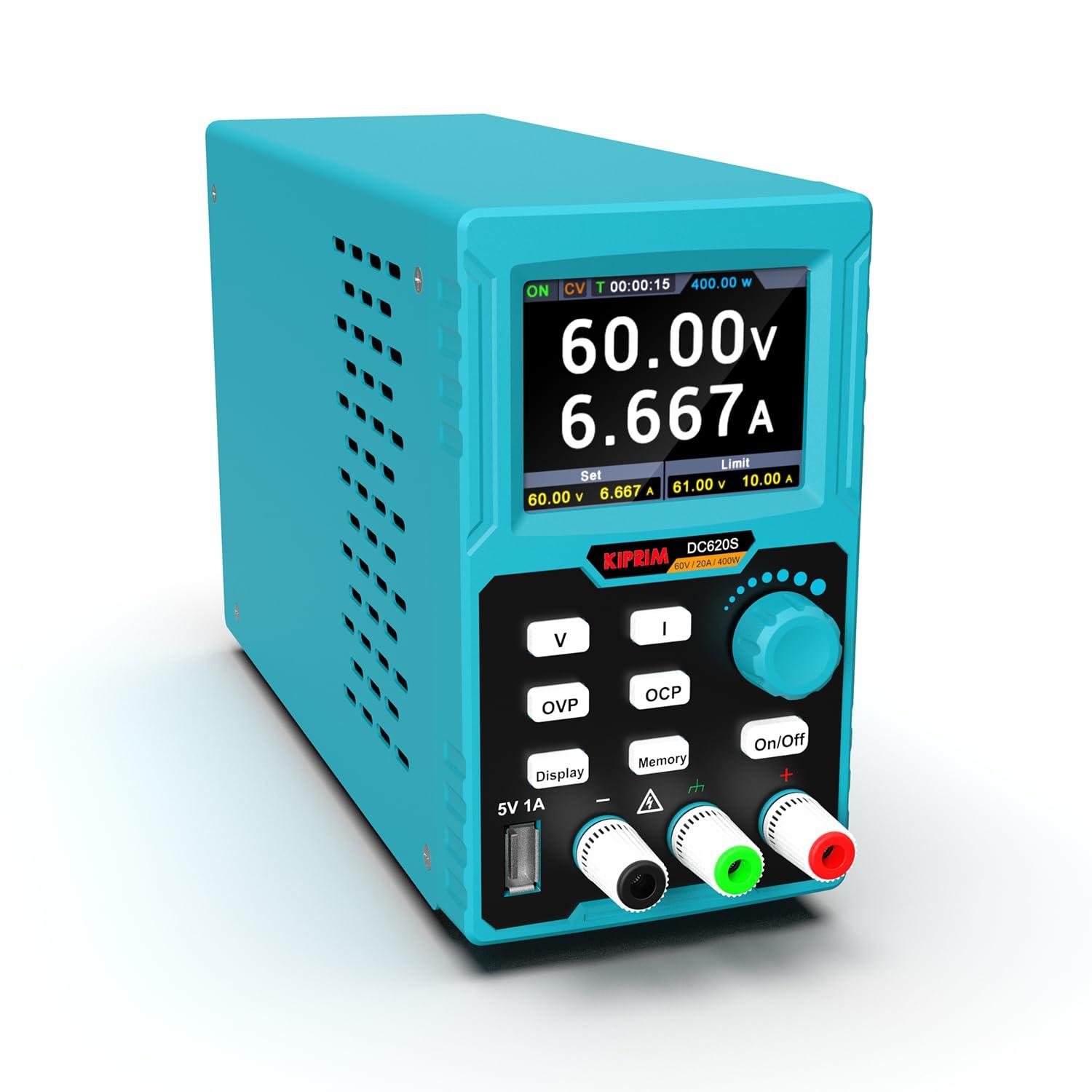
Ever feel annoyed when your electronics project will not turn on? You need a tool that makes testing easy and safe. The Kiprim DC620S lets you control power with simple features. You can trust this DC power supply to give steady power, keep your devices safe, and show all the info you need on a bright screen. Testing electronics is now easier and more reliable than before.
Key Takeaways
The Kiprim DC620S lets you control voltage and current exactly. You can set the numbers you need for your electronics projects.
The memory key helps you save time. You can store up to four settings. You can get them back with one button press.
The LCD display is bright and easy to read. It shows voltage, current, and power as they change. You can check your setup quickly.
Safety features are built in to protect your devices. They stop overvoltage, overcurrent, and short circuits. This keeps your devices safe while you test.
The Kiprim DC620S is small and easy to carry. It works for both small and big projects. This makes your testing better.
DC Power Supply Features
Precision Control
You want your electronics to work right every time. The Kiprim DC620S gives you full control over voltage and current. You can set the exact numbers you need for your project. This DC power supply covers a wide range, so you can use it for many different tasks. Take a look at how it compares:
Model | Voltage Range | Current Range |
|---|---|---|
Kiprim DC620S | 0-20 A |
You can test small circuits or power bigger devices. You do not have to worry about guessing or making mistakes. The controls are easy to use, so you can focus on your work.
Memory Key Function
Do you work on lots of projects? The memory key function saves you time. You can store up to four sets of settings. Just press a button to switch between them. No need to write down numbers or reset everything each time. This feature helps you work faster and keeps your results consistent. You can move from one project to another without missing a beat.
Tip: Save your most-used settings to the memory keys. You will save time and avoid mistakes.
LCD Display
You get a bright, colorful 2.8-inch LCD display with the Kiprim DC620S. It shows you real-time numbers for voltage, current, and power. You can also see dynamic curves that help you spot changes right away. The display makes it easy to check your settings at a glance. You do not have to guess or use extra tools. Everything you need is right in front of you.
Safety Protections
Safety matters when you test electronics. The Kiprim DC620S has built-in protections that keep you and your devices safe. Here is how it matches up with industry standards:
Safety Feature | Kiprim DC620S | Industry Standard |
|---|---|---|
Overvoltage Protection | Yes | Yes |
Overcurrent Protection | Yes | Yes |
Short-Circuit Protection | Yes | Yes |
These features help prevent accidents and damage. You get peace of mind every time you use this DC power supply. Here is what these protections do for you:
Stop too much voltage from reaching your device.
Prevent too much current from causing harm.
Cut off power if there is a short circuit.
You can test with confidence. The DC power supply takes care of the safety, so you can focus on your project.
Testing Benefits

Fast Setup
You want to get started quickly. The Kiprim DC620S makes setup easy. You can adjust voltage and current with just a few taps. The memory key function lets you save your favorite settings. You do not have to enter numbers every time. Just press a button and you are ready to test. The LCD display shows all the important details, so you know your setup is correct. You spend less time preparing and more time working on your project.
Tip: Use the memory keys for your most common tests. You will save time and avoid mistakes.
Consistent Results
You need your tests to be reliable. The Kiprim DC620S helps you get the same results every time. The DC power supply gives steady power, so your devices work as expected. The real-time display shows voltage, current, and power. You can see changes right away. If something goes wrong, the safety protections step in. You do not have to worry about damaging your devices. You can trust your results and feel confident in your work.
Steady voltage and current for accurate testing
Real-time feedback on the LCD display
Built-in safety features for peace of mind
Versatility
You work on many different projects. The Kiprim DC620S supports a wide range of devices. You can test small circuits or power bigger machines. The adjustable output covers 0-60 volts and 0-20 amps. The compact design fits on any desk and is easy to carry. You can use it at home, in the lab, or on the go. Take a look at how it stands out:
Feature | Description |
|---|---|
Adjustable Output | Supports a range of devices with output specifications of 0-60V and 0-20A. |
Memory Key | Allows saving and recalling of 4 sets of channel parameters for convenience. |
Real-time Display | Displays voltage, current, power, and protection data dynamically. |
Compact Design | Portable dimensions (8.9 x 5.6 x 3.2 inches) and lightweight (3.3 pounds). |
You get flexibility for any workspace. You can move the power supply wherever you need it. You do not have to buy different tools for different jobs. The Kiprim DC620S is ready for anything.
Comparison with Traditional Power Supplies
Efficiency
You want your workbench to run smoothly. Traditional power supplies often slow you down. You have to turn knobs, check meters, and sometimes guess if your settings are right. The Kiprim DC620S changes that. You get digital controls, memory keys, and a bright LCD display. You can set your voltage and current in seconds. No more wasting time with trial and error.
Let’s look at how the Kiprim DC620S stacks up against other models on price and performance:
Product Name | Price (USD) | Max Output | Voltage Range | Current Limit |
|---|---|---|---|---|
Kiprim DC620S | $155.99 | 400W | 0-60V | 20A |
Kiprim DC310Pro | $125.99 | 300W | 0-30V | 10A |
Kiprim DC310S | $112.99 | 300W | 0-30V | 10A |
Kiprim DC605S | $125.99 | 300W | 0-60V | 5A |
Kiprim DC605Pro | $119.99 | 300W | 0-60V | 5A |
You can see that the Kiprim DC620S gives you more power and a wider range. You get great value for your money. Here’s a quick look at the price-to-performance ratio:
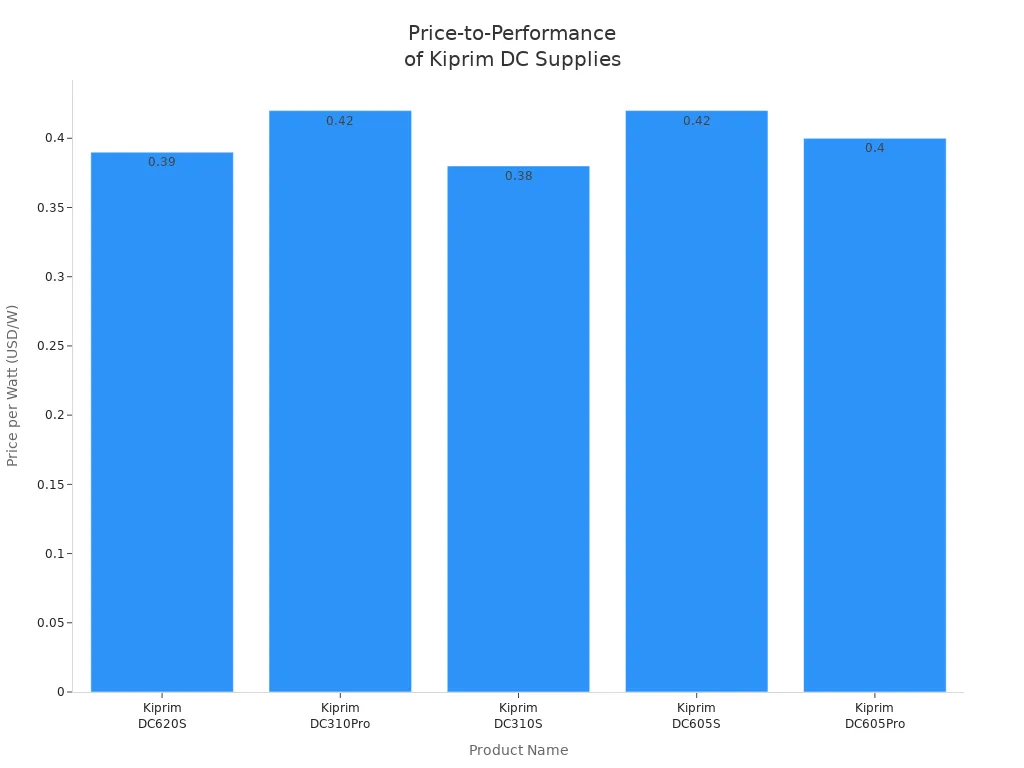
Note: The Kiprim DC620S offers more power and features for just a little more cost. You get more done in less time.
Error Reduction
Mistakes can ruin your project. Old power supplies make it easy to set the wrong voltage or current. You might damage your circuit or waste hours fixing errors. The Kiprim DC620S helps you avoid these problems. The memory key function lets you save your favorite settings. You just press a button to recall them. The LCD display shows your settings clearly, so you always know what’s going on.
Here’s how you reduce errors with the Kiprim DC620S:
Save and recall up to four settings with memory keys.
See real-time voltage and current on the LCD display.
Use built-in safety features to protect your devices.
You spend less time double-checking and more time building. Your results stay consistent, and your devices stay safe.
User Experiences
Real-World Testing
You want to know if the Kiprim DC620S really makes a difference. Let’s look at what other users say about their experience.
“I used to spend a lot of time setting up my old power supply. With the Kiprim DC620S, I just press a memory key and start testing. It’s so much faster!”
— Alex, electronics hobbyist
Many users love how easy it is to switch between projects. You can save your favorite settings and recall them with one touch. This feature helps you avoid mistakes and saves you time.
Here are some ways people use the Kiprim DC620S:
You can test small circuit boards for school projects.
You can power up motors for robotics.
You can check the safety of new devices before using them.
One user shared,
“The LCD display shows me everything I need. I can see the voltage and current right away. If something goes wrong, the safety features protect my devices. I feel confident every time I use it.”
— Jamie, repair technician
You might work in a small space. The compact size of the Kiprim DC620S fits right on your desk. You can move it easily from one place to another. Many users say this makes their workbench less crowded.
Here’s a quick look at what users like most:
Feature | User Feedback |
|---|---|
Memory Key | Saves time, easy to use |
LCD Display | Clear, shows real-time information |
Safety Protections | Keeps devices safe, gives confidence |
Compact Design | Fits anywhere, easy to carry |
You can see that real users find testing easier and safer. The Kiprim DC620S helps you work faster and with more confidence.
You need a tool that helps you test electronics easily and safely. The Kiprim DC620S does this for you. It lets you change power up to 60V and 20A. You can see exact numbers on the 4-digit display. It has strong safety features like Over Current and Over Voltage Protection.
Discover the Kiprim DC620S
Explore the advanced features and reliability of the Kiprim DC620S 400W DC Power Supply for your projects.
Change power for any project
See clear and correct numbers
Count on safety features every time
If you want to finish work faster and do better, now is a good time to get new testing tools. With tools like this, testing electronics will be easier in the future.
FAQ
How do I save my favorite settings on the Kiprim DC620S?
You just press one of the memory keys (M1–M4) after setting your voltage and current. The power supply saves your settings. Next time, press the same key to recall them instantly.
Can I use the Kiprim DC620S for both small and large projects?
Yes! You can power tiny circuits or bigger devices. The wide range—0 to 60 volts and up to 20 amps—makes it perfect for many projects.
What safety features protect my devices?
The Kiprim DC620S has built-in protections:
Overvoltage protection
Overcurrent protection
Short-circuit protection
You can test with peace of mind.
Is the Kiprim DC620S easy to move around?
Absolutely! The compact size and light weight make it easy to carry. You can use it at your desk, in the lab, or even take it to a friend’s house.
See Also
Simplifying Your Projects With The Kiprims DC310S Power Supply
